> This is the Markdown version of the page. For the complete Lattice Developers documentation index, fetch https://developer.anduril.com/llms.txt. Append .md to any page URL for its clean Markdown.
# Upload objects
> Storing binary data in Lattice using the SDK
In Lattice, an **object** is a data model that represents a single file or a piece of data. This page explains how to upload an object to Lattice
and associate it with an entity using the Lattice SDK.
In the following steps, you use an image, and a CSV file. Lattice, however, supports all binary data, letting you use objects
to implement a variety of use-cases. For example, consider a scenario where an image sensor integrated with Lattice detects
a track image and uploads an image of it to Lattice. After the file is uploaded, any device, app, or operator in Lattice
can access the image associated with the track.
To implement this use-case, you use the following API operations:
* [**`UploadObject`**](/reference/rest/objects/upload-object) -- Uploads an object using multiform data.
* [**`PutEntityOverride`**](/reference/rest/entities/override-entity) -- Override the entity
and update the entity's [`media`](/reference/rest/entities/publish-entity#request.body.media) component.
> **Info**
>
> Entity overrides let any integration update certain components in an entity,
> even if the entity was initially published by another data source. This means that
> anyone connected to Lattice can update the media associated with the entity, giving you
> more flexibility.
## Before you begin
* To configure your app to upload objects, [set up](/guides/getting-started/set-up) your Lattice environment.
* See an overview of the [Object schema and the Object Store API](/guides/objects/overview) in Lattice.
> **gRPC authentication**
>
> These gRPC examples authenticate with a static environment token attached as request metadata.
> If you are using OAuth 2.0 client credentials instead, [set up the token refresh module](/guides/getting-started/authenticate#client-credentials) before running the examples on this page.
## Upload an object
In Lattice, an **object** is a data model that represents a single file or a piece of data. To upload an object to Lattice, do the following:
#### Choose an image
Choose an image to upload to Lattice, and save it locally.
#### Upload the image to Lattice
Run the following code from the same folder where you saved the image.
To upload, use [`UploadObject`](/reference/rest/objects/upload-object) and replace the following:
* **file\_path**: the path to the file you want to upload to Lattice.
```go title={"Go"} maxLines={25}
package main
import (
"bytes"
"context"
"fmt"
"net/http"
"os"
"path/filepath"
"github.com/anduril/lattice-sdk-go/v5/client"
"github.com/anduril/lattice-sdk-go/v5/option"
)
func main() {
// Get environment variables.
latticeEndpoint := os.Getenv("LATTICE_ENDPOINT")
environmentToken := os.Getenv("ENVIRONMENT_TOKEN")
// Remove sandboxesToken from the following statements if you are not developing on Sandboxes.
sandboxesToken := os.Getenv("SANDBOXES_TOKEN")
// Check required environment variables.
if latticeEndpoint == "" || environmentToken == "" || sandboxesToken == "" {
fmt.Println("Missing required environment variables")
os.Exit(1)
}
// Initialize headers for sandbox authorization.
headers := http.Header{}
headers.Add("Anduril-Sandbox-Authorization", fmt.Sprintf("Bearer %s", sandboxesToken))
// Create the client
c := client.NewClient(
option.WithToken(environmentToken),
option.WithBaseURL(fmt.Sprintf("https://%s", latticeEndpoint)),
option.WithHTTPHeader(headers),
)
// Set the file path.
filePath := ""
// Get the file name.
fileName := filepath.Base(filePath)
// Read the file contents into a byte slice.
fileContent, err := os.ReadFile(filePath)
if err != nil {
fmt.Printf("Error reading file: %v\n", err)
os.Exit(1)
}
// Create context for the request.
ctx := context.Background()
// Upload the file to Lattice.
response, err := c.Objects.UploadObject(ctx, fileName, bytes.NewReader(fileContent))
if err != nil {
fmt.Printf("Error uploading object: %v\n", err)
os.Exit(1)
}
// Get the content identifier path.
path := response.ContentIdentifier.Path
fmt.Printf("Object path: /api/v1/objects/%s\n", path)
}
```
```java title={"Java"} maxLines={25}
package org.example;
import java.io.File;
import java.io.FileInputStream;
import com.anduril.Lattice;
public class Upload {
public static void main(String[] args) {
// Get environment variables
String endpoint = System.getenv("LATTICE_ENDPOINT");
String environmentToken = System.getenv("ENVIRONMENT_TOKEN");
String sandboxesToken = System.getenv("SANDBOXES_TOKEN");
// Check required variables and ensure URL has https://
if (endpoint == null || environmentToken == null || sandboxesToken == null) {
System.err.println("Missing required environment variables");
System.exit(1);
}
if (!endpoint.startsWith("https://")) endpoint = "https://" + endpoint;
try {
// Create Lattice client with Sandbox authentication
Lattice client = Lattice.builder()
.url(endpoint)
.token(environmentToken)
.addHeader("Anduril-Sandbox-Authorization", "Bearer " + sandboxesToken)
.build();
// Set the file path
String filePath = "";
File file = new File(filePath);
// Get the file name
String fileName = file.getName();
String objectPath = fileName;
// Open the file and upload it
try (FileInputStream fileStream = new FileInputStream(file)) {
// Upload the file to Lattice
Object response = client.objects().uploadObject(objectPath, fileStream);
System.out.println("Object path: /api/v1/objects/" + response);
} catch (Exception e) {
System.err.println("Error uploading object: " + e.getMessage());
}
} catch (Exception e) {
System.err.println("Error initializing client: " + e.getMessage());
}
}
}
```
```py title={"Python"} maxLines={25}
from anduril import Lattice
import os
import sys
import asyncio
lattice_endpoint = os.getenv('LATTICE_ENDPOINT')
environment_token = os.getenv('ENVIRONMENT_TOKEN')
# Remove sandboxes_token from the following statements if you are not developing on Sandboxes.
sandboxes_token = os.getenv('SANDBOXES_TOKEN')
if not environment_token or not lattice_endpoint or not sandboxes_token:
print("Missing required environment variables.")
sys.exit(1)
client = Lattice(
base_url=f"https://{lattice_endpoint}",
token=lambda: str(environment_token),
# Remove the following if you are not developing on Sandboxes.
headers={ "anduril-sandbox-authorization": f"Bearer {sandboxes_token}" }
)
async def app(file_path):
try:
# Get the file name.
file_name = os.path.basename(file_path)
# Define a unique path for the object using the file name.
object_path = f"{file_name}"
# Open the file in binary mode.
with open(f"{file_path}", "rb") as file:
# Use the upload_object method to upload the file to Lattice.
response = client.objects.upload_object(
object_path=object_path,
request=file
)
object_path = f"/api/v1/objects/{response.content_identifier.path}"
print(f"Object path: {object_path}")
except asyncio.CancelledError:
print(">>>Exiting...")
except Exception as error:
print(error)
if __name__ == "__main__":
# Set the file path.
asyncio.run(app(file_path=""))
```
```ts title={"Typescript"} maxLines={25}
import { LatticeClient } from "@anduril-industries/lattice-sdk";
import { basename } from 'path';
import { createReadStream } from "fs";
const latticeEndpoint = process.env.LATTICE_ENDPOINT;
const environmentToken = process.env.ENVIRONMENT_TOKEN;
// Remove sandboxesToken from the following statements if you are not developing on Sandboxes.
const sandboxesToken = process.env.SANDBOXES_TOKEN;
if (!latticeEndpoint || !environmentToken || !sandboxesToken) {
console.log('Missing required environment variables.');
process.exit(1);
}
const client = new LatticeClient(
{
baseUrl: `https://${latticeEndpoint}`,
token: environmentToken,
// Remove the header if you are not developing on Sandboxes.
headers: { "Anduril-Sandbox-Authorization": `Bearer ${sandboxesToken}` }
}
);
async function App(filePath: string) {
const fileStreamReadable = createReadStream(filePath);
try {
// Set the object path using the file name.
const objectPath = `${basename(filePath)}`;
// Upload the file to Lattice.
const result = await client.objects.uploadObject(fileStreamReadable, objectPath);
console.log(`Object uploaded successfully. Object path: ${result.content_identifier.path}`);
} catch (error) {
if (error instanceof Error && error.name === 'AbortError') {
console.log('Process interrupted. Exiting...');
process.exit(0);
} else {
console.log(`Encountered the following error: ${error}`);
process.exit(1);
}
} finally {
fileStreamReadable.close();
}
}
// Replace filepath with the path of the file you want to upload.
const filePath = "";
App(filePath);
```
```rs title={"Rust"} startLine={35} maxLines={25}
use anduril_lattice_sdk::prelude::*;
use std::env;
#[tokio::main]
async fn main() -> Result<(), Box> {
let lattice_endpoint = env::var("LATTICE_ENDPOINT")
.expect("LATTICE_ENDPOINT environment variable not set");
let environment_token = env::var("ENVIRONMENT_TOKEN")
.expect("ENVIRONMENT_TOKEN environment variable not set");
// Remove sandboxes_token if you are not developing on Sandboxes.
let sandboxes_token = env::var("SANDBOXES_TOKEN")
.expect("SANDBOXES_TOKEN environment variable not set");
if environment_token.is_empty() || lattice_endpoint.is_empty() || sandboxes_token.is_empty() {
eprintln!("Missing required environment variables:");
eprintln!(" LATTICE_ENDPOINT");
eprintln!(" ENVIRONMENT_TOKEN");
eprintln!(" SANDBOXES_TOKEN");
std::process::exit(1);
}
let config = ClientConfig {
base_url: format!("https://{}", lattice_endpoint),
token: Some(environment_token),
// Remove custom_headers if you are not developing on Sandboxes.
custom_headers: HashMap::from([(
"anduril-sandbox-authorization".to_string(),
format!("Bearer {}", sandboxes_token),
)]),
..Default::default()
};
let client = Lattice::new(config)?;
// Set the file path to upload.
let file_path = "";
let result = async {
// Derive the object name from the file name and read the file bytes.
let file_name = std::path::Path::new(file_path)
.file_name()
.and_then(|n| n.to_str())
.unwrap_or(file_path);
let object_path = file_name.to_string();
let bytes = std::fs::read(file_path)?;
// Use the upload_object method to upload the file to Lattice.
let response = client.objects.upload_object(&object_path, &bytes, None).await?;
println!(
"Object path: /api/v1/objects/{}",
response.content_identifier.path
);
Ok::<(), Box>(())
}
.await;
if let Err(e) = result {
eprintln!("{}", e);
}
Ok(())
}
```
> **Warning**
>
> An object path must only contain the following characters: `A-Z`,
> `a-z`, `0-9`, `.`
> `_`, `-`.
#### Verify the response
If successful, you'll see the following output.
```bash
$ python upload.py
INFO - HTTP Request: POST https://lattice-50802.env.sandboxes.developer.anduril.com/api/v1/objects/test-1.test.jpg "HTTP/1.1 200 OK"
INFO - Object path: /api/v1/objects/cessna.jpg
```
Note the object path: `/api/v1/objects/cessna.jpg`.
In the following section, you'll override an entity to associate it with this object using its unique object path.
This lets Lattice know to display the image in the entity panel as a thumbnail.
#### Verify the object in the Lattice UI
To confirm the object uploaded, open the Lattice UI and find it in the Object Explorer.
Search by the object path, then download the object to verify its contents are as expected:

## Link an object
To associate an image with an entity, do the following:
#### Override the entity
Use the
[`OverrideEntity`](/reference/rest/entities/override-entity) operation to override the entity's
[`media`](/reference/rest/entities/publish-entity#request.body.media) component and replace `MediaItem`.
To implement a thumbnail, set [`MediaItem.type`](/reference/rest/entities/publish-entity#request.body.media.media.type) to `MEDIA_TYPE_IMAGE`.
This lets Lattice know to process the binary object as an image.
Replace the temporary values with your information, then run the code:
* **object\_path**: The unique path of the object in Lattice. For this example, use `/api/v1/objects/test-1.test.jpg`.
* **entity\_id**: The ID of the entity you want to associate with the object. If you are developing
in Sandboxes, enter `adsbEntity` to use an existing simulated entity.
```go title={"Go (REST)"} maxLines={25}
package main
import (
"context"
"fmt"
"net/http"
"os"
"time"
Lattice "github.com/anduril/lattice-sdk-go/v5"
"github.com/anduril/lattice-sdk-go/v5/client"
"github.com/anduril/lattice-sdk-go/v5/option"
)
func main() {
// Get environment variables
latticeEndpoint := os.Getenv("LATTICE_ENDPOINT")
environmentToken := os.Getenv("ENVIRONMENT_TOKEN")
// Remove sandboxesToken from the following statements if you are not developing on Sandboxes.
sandboxesToken := os.Getenv("SANDBOXES_TOKEN")
// Check required environment variables
if latticeEndpoint == "" || environmentToken == "" || sandboxesToken == "" {
fmt.Println("Missing required environment variables")
os.Exit(1)
}
// Initialize headers for sandbox authorization
headers := http.Header{}
headers.Add("Anduril-Sandbox-Authorization", fmt.Sprintf("Bearer %s", sandboxesToken))
// Create the client
LatticeClient := client.NewClient(
option.WithToken(environmentToken),
option.WithBaseURL(fmt.Sprintf("https://%s", latticeEndpoint)),
option.WithHTTPHeader(headers),
)
// Set the path to the object and entity ID
objectPath := "/api/v1/objects/"
entityID := "adsbEntity"
// Create context for the request
ctx := context.Background()
mediaItem := &Lattice.MediaItem{
Type: Lattice.MediaItemTypeMediaTypeImage.Ptr(),
RelativePath: &objectPath,
}
// Create media object with the media item
mediaItems := []*Lattice.MediaItem{mediaItem}
media := Lattice.Media{
Media: mediaItems,
}
// Create a provenance object
latestTimestamp := time.Now().UTC()
// Create an entity with the media
entity := Lattice.EntityOverride{
EntityID: entityID,
FieldPath: "media.media",
Entity: &Lattice.Entity{
EntityID: &entityID,
Media: &media,
},
Provenance: &Lattice.Provenance{
IntegrationName: Lattice.String("your_integration_name"),
DataType: Lattice.String("test_data"),
SourceUpdateTime: Lattice.Time(latestTimestamp),
},
}
// Override the entity's media
_, err := LatticeClient.Entities.OverrideEntity(
ctx,
&entity,
)
// Handle errors
if err != nil {
fmt.Printf("Exception: %v\n", err)
} else {
fmt.Printf("Successfully added media to entity: %s\n", entityID)
}
}
```
```java title={"Java (REST)"} maxLines={25}
package org.example;
import java.time.OffsetDateTime;
import java.time.ZoneOffset;
import java.util.Collections;
import com.anduril.Lattice;
import com.anduril.resources.entities.requests.EntityOverride;
import com.anduril.types.Entity;
import com.anduril.types.Media;
import com.anduril.types.MediaItem;
import com.anduril.types.MediaItemType;
import com.anduril.types.Provenance;
/**
* Example application that demonstrates how to add a media item to an entity using the Lattice SDK.
*/
public class OverrideMediaAdd {
public static void main(String[] args) {
// Get environment variables
String endpoint = System.getenv("LATTICE_ENDPOINT");
String environmentToken = System.getenv("ENVIRONMENT_TOKEN");
String sandboxesToken = System.getenv("SANDBOXES_TOKEN");
// Check required variables and ensure URL has https://
if (endpoint == null || environmentToken == null || sandboxesToken == null) {
System.err.println("Missing required environment variables");
System.exit(1);
}
if (!endpoint.startsWith("https://")) endpoint = "https://" + endpoint;
try {
// Create Lattice client with Sandbox authentication
Lattice client = Lattice.builder()
.url(endpoint)
.token(environmentToken)
.addHeader("Anduril-Sandbox-Authorization", "Bearer " + sandboxesToken)
.build();
// Set the path to the object and entity ID
String objectPath = "/api/v1/objects/test.jpg";
String entityId = "adsbEntity";
// Create a media item
MediaItem mediaItem = MediaItem.builder()
.relativePath(objectPath)
.type(MediaItemType.MEDIA_TYPE_IMAGE)
.build();
// Create a Media object with the media item
Media media = Media.builder()
.media(Collections.singletonList(mediaItem))
.build();
// Create a provenance object
Provenance provenance = Provenance.builder()
.integrationName("your_integration_name")
.dataType("your_data_type")
.sourceUpdateTime(OffsetDateTime.now(ZoneOffset.UTC))
.build();
// Create an entity with the media
EntityOverride entityOverride = EntityOverride.builder()
.entity(Entity.builder()
.entityId(entityId)
.media(media)
.build())
.provenance(provenance)
.build();
// Override the entity's media
client.entities().overrideEntity(
entityId,
"media.media",
entityOverride
);
System.out.println("Successfully added media to entity: " + entityId);
} catch (Exception e) {
System.err.println("Exception: " + e.getMessage());
}
}
}
```
```py title={"Python (REST)"} maxLines={25}
from anduril import Lattice, Media, MediaItem, Entity, Provenance
from datetime import datetime, timezone
import os
import sys
import asyncio
lattice_endpoint = os.getenv('LATTICE_ENDPOINT')
environment_token = os.getenv('ENVIRONMENT_TOKEN')
# Remove sandboxes_token from the following statements if you are not developing on a Sandboxes.
sandboxes_token = os.getenv('SANDBOXES_TOKEN')
if not environment_token or not lattice_endpoint or not sandboxes_token:
print("Missing required environment variables.")
sys.exit(1)
client = Lattice(
base_url=f"https://{lattice_endpoint}",
token=lambda: str(environment_token),
# Remove the following if you are not developing on a Sandboxes.
headers={ "anduril-sandbox-authorization": f"Bearer {sandboxes_token}" }
)
async def app(object_path, entity_id):
try:
latest_timestamp = datetime.now(timezone.utc)
provenance = Provenance(
integration_name="your_integration_name",
data_type="your_data_type",
source_update_time=latest_timestamp
)
media = Media(
media=[
MediaItem(
relative_path=object_path,
# Set the media type to thumbnail.
type="MEDIA_TYPE_IMAGE"
)
]
)
client.entities.override_entity(
entity_id=entity_id,
field_path="media.media",
entity=Entity(
entity_id=entity_id,
media=media
),
provenance=provenance
)
except Exception as error:
print(f"Exception: {error}")
if __name__ == "__main__":
# Set the path to the object and entity ID
asyncio.run(app(object_path="/api/v1/objects/", entity_id="adsbEntity"))
```
```ts title={"Typescript (REST)"} maxLines={25}
import { LatticeClient } from "@anduril-industries/lattice-sdk";
const latticeEndpoint = process.env.LATTICE_ENDPOINT;
const environmentToken = process.env.ENVIRONMENT_TOKEN;
// Remove sandboxesToken from the following statements if you are not developing on Sandboxes.
const sandboxesToken = process.env.SANDBOXES_TOKEN;
if (!latticeEndpoint || !environmentToken || !sandboxesToken) {
console.log('Missing required environment variables.');
process.exit(1);
}
const client = new LatticeClient(
{
baseUrl: `https://${latticeEndpoint}`,
token: environmentToken,
// Remove the header if you are not developing on Sandboxes.
headers: { "Anduril-Sandbox-Authorization": `Bearer ${sandboxesToken}` }
}
);
async function App(entityId: string, objectPath: string) {
const latestTimestamp = new Date().toISOString();
try {
// Override the nested media.media component of the entity.
await client.entities.overrideEntity(
{
entityId,
fieldPath: 'media.media',
entity: {
entityId: entityId,
media: {
media: [
{
relativePath: objectPath,
type: "MEDIA_TYPE_IMAGE"
}
]
}
},
provenance: {
integrationName: "your_integration_name",
dataType: "your_data_type",
sourceDescription: latestTimestamp
}
}
);
console.log(`Successfully overridden media for entity ${entityId}`);
} catch (error) {
console.log(`Encountered the following error while fetching entity: ${error}`);
}
}
// Replace entityId with the ID of the entity you want to override.
// Replace objectPath with the path of the object you want to link to the entity.
const entityId = 'adsbEntity';
const objectPath = '/api/v1/objects/';
App(entityId, objectPath);
```
```rs title={"Rust (REST)"} startLine={35} maxLines={25}
use anduril_lattice_sdk::prelude::*;
use std::env;
#[tokio::main]
async fn main() -> Result<(), Box> {
let lattice_endpoint = env::var("LATTICE_ENDPOINT")
.expect("LATTICE_ENDPOINT environment variable not set");
let environment_token = env::var("ENVIRONMENT_TOKEN")
.expect("ENVIRONMENT_TOKEN environment variable not set");
// Remove sandboxes_token if you are not developing on Sandboxes.
let sandboxes_token = env::var("SANDBOXES_TOKEN")
.expect("SANDBOXES_TOKEN environment variable not set");
if environment_token.is_empty() || lattice_endpoint.is_empty() || sandboxes_token.is_empty() {
eprintln!("Missing required environment variables:");
eprintln!(" LATTICE_ENDPOINT");
eprintln!(" ENVIRONMENT_TOKEN");
eprintln!(" SANDBOXES_TOKEN");
std::process::exit(1);
}
let config = ClientConfig {
base_url: format!("https://{}", lattice_endpoint),
token: Some(environment_token),
// Remove custom_headers if you are not developing on Sandboxes.
custom_headers: HashMap::from([(
"anduril-sandbox-authorization".to_string(),
format!("Bearer {}", sandboxes_token),
)]),
..Default::default()
};
let client = Lattice::new(config)?;
// Set the path to the object and the entity ID to override.
let object_path = "/api/v1/objects/";
let entity_id = "";
let latest_timestamp = Utc::now().fixed_offset();
let provenance = Provenance {
integration_name: Some("your_integration_name".to_string()),
data_type: Some("your_data_type".to_string()),
source_update_time: Some(latest_timestamp),
..Default::default()
};
let media = Media {
media: Some(vec![MediaItem {
relative_path: Some(object_path.to_string()),
// Set the media type to image.
r#type: Some(MediaItemType::MediaTypeImage),
..Default::default()
}]),
..Default::default()
};
let override_request = EntityOverride {
entity: Some(Entity {
entity_id: Some(entity_id.to_string()),
media: Some(media),
..Default::default()
}),
provenance: Some(provenance),
};
let result = async {
client
.entities
.override_entity(entity_id, "media.media", &override_request, None)
.await?;
// Re-fetch the entity to confirm the media override was applied.
let entity = client.entities.get_entity(entity_id, None).await?;
println!("Entity: {:?}", entity.entity_id);
println!("Media: {:?}", entity.media);
Ok::<(), ApiError>(())
}
.await;
if let Err(e) = result {
eprintln!("Exception: {}", e);
}
Ok(())
}
```
```go title={"Go (gRPC)"} maxLines={25}
// This Go example is compatible with artifacts generated using
// the following grpc/go plugin: https://buf.build/anduril/lattice-sdk/sdks/main:grpc/go
package main
import (
"context"
"fmt"
"log"
"os"
"time"
"schema-registry.developer.anduril.com/gen/go/anduril/lattice-sdk/grpc/go/anduril/entitymanager/v1/entitymanagerv1grpc"
entitymanagerv1 "schema-registry.developer.anduril.com/gen/go/anduril/lattice-sdk/protocolbuffers/go/anduril/entitymanager/v1"
"google.golang.org/grpc"
"google.golang.org/grpc/credentials"
"google.golang.org/protobuf/types/known/timestamppb"
)
func main() {
// Get environment variables
environmentToken := os.Getenv("ENVIRONMENT_TOKEN")
latticeEndpoint := os.Getenv("LATTICE_ENDPOINT")
sandboxesToken := os.Getenv("SANDBOXES_TOKEN")
// Check required environment variables
if latticeEndpoint == "" || environmentToken == "" || sandboxesToken == "" {
fmt.Println("Missing required environment variables")
os.Exit(1)
}
// Setup authentication
auth := &BearerTokenAuth{
Token: environmentToken,
SandboxesToken: sandboxesToken,
}
// Setup gRPC connection options
opts := []grpc.DialOption{
grpc.WithTransportCredentials(credentials.NewClientTLSFromCert(nil, "")),
grpc.WithPerRPCCredentials(auth),
}
// Create gRPC connection
conn, err := grpc.NewClient(latticeEndpoint, opts...)
if err != nil {
log.Fatalf("Did not connect: %v", err)
}
defer conn.Close()
// Create EntityManager client
client := entitymanagerv1grpc.NewEntityManagerAPIClient(conn)
// Set the path to the object and entity ID
objectPath := "/api/v1/objects/"
entityID := "adsbEntity"
// Create context for the request
ctx := context.Background()
// Create media item
mediaItem := &entitymanagerv1.MediaItem{
Type: entitymanagerv1.MediaType_MEDIA_TYPE_IMAGE,
RelativePath: objectPath,
}
// Create media object with the media item
mediaItems := []*entitymanagerv1.MediaItem{mediaItem}
media := &entitymanagerv1.Media{
Media: mediaItems,
}
// Create a provenance object with current timestamp
latestTimestamp := time.Now().UTC()
provenance := &entitymanagerv1.Provenance{
IntegrationName: "your_integration_name",
DataType: "test_data",
SourceUpdateTime: timestamppb.New(latestTimestamp),
}
// Create an entity with the media
entity := &entitymanagerv1.Entity{
EntityId: entityID,
Media: media,
}
// Create the override entity request
request := &entitymanagerv1.OverrideEntityRequest{
Entity: entity,
FieldPath: []string{"media.media"},
Provenance: provenance,
}
// Call the OverrideEntity method
_, err = client.OverrideEntity(ctx, request)
// Handle errors
if err != nil {
fmt.Printf("Exception: %v\n", err)
} else {
fmt.Printf("Successfully added media to entity: %s\n", entityID)
}
}
```
```py title={"Python (gRPC)"} maxLines={25}
# This Python example is compatible with artifacts generated using the following
# Buf plugins: https://schema-registry.developer.anduril.com/anduril/lattice-sdk/sdks/main:bufbuild/py
# and https://schema-registry.developer.anduril.com/anduril/lattice-sdk/sdks/main:connectrpc/py
import os
import sys
from datetime import datetime, timezone
from bearer_auth import create_client
from protobuf.wkt import Timestamp
from anduril.entitymanager.v1.entity_pub_pb import Entity, Provenance
from anduril.entitymanager.v1.entity_manager_api_pub_pb import OverrideEntityRequest
from anduril.entitymanager.v1.entity_manager_api_pub_connect import EntityManagerAPIClientSync
from anduril.entitymanager.v1.media_pub_pb import Media, MediaItem, MediaType
def main():
environment_token = os.getenv("ENVIRONMENT_TOKEN")
lattice_endpoint = os.getenv("LATTICE_ENDPOINT")
sandboxes_token = os.getenv("SANDBOXES_TOKEN")
if not environment_token or not lattice_endpoint or not sandboxes_token:
print("Missing required environment variables", file=sys.stderr)
sys.exit(1)
# Create the API client over Connect gRPC with authentication
client = create_client(EntityManagerAPIClientSync, lattice_endpoint, environment_token, sandboxes_token)
# Set the path to the object and entity ID
object_path = "/api/v1/objects/"
entity_id = "adsbEntity"
# Create media item and wrap it in a Media component
media_item = MediaItem(type=MediaType.IMAGE, relative_path=object_path)
media = Media(media=[media_item])
# Provenance with current timestamp
latest_timestamp = Timestamp.from_datetime(datetime.now(timezone.utc))
provenance = Provenance(
integration_name="your_integration_name",
data_type="test_data",
source_update_time=latest_timestamp,
)
entity = Entity(entity_id=entity_id, media=media)
request = OverrideEntityRequest(
entity=entity,
field_path=["media.media"],
provenance=provenance,
)
try:
client.override_entity(request)
print(f"Successfully added media to entity: {entity_id}")
except Exception as error:
print(f"Exception: {error}", file=sys.stderr)
if __name__ == "__main__":
main()
```
```rs title={"Rust (gRPC)"} maxLines={25}
// This Rust example is compatible with artifacts generated using
// the following grpc/rust plugin: https://buf.build/anduril/lattice-sdk/sdks/main:community/neoeinstein-tonic
mod bearer_auth;
use anduril_lattice_sdk_community_neoeinstein_prost::anduril::entitymanager::v1::{
Entity, Media, MediaItem, MediaType, OverrideEntityRequest, Provenance,
};
use anduril_lattice_sdk_community_neoeinstein_tonic::anduril::entitymanager::v1::tonic::entity_manager_api_client::EntityManagerApiClient;
use bearer_auth::EnvironmentTokenAuth;
use prost_types::Timestamp;
use tonic::metadata::MetadataValue;
use tonic::transport::{Channel, ClientTlsConfig};
use tonic::Request;
use std::env;
use std::time::{SystemTime, UNIX_EPOCH};
fn now_timestamp() -> Timestamp {
let d = SystemTime::now().duration_since(UNIX_EPOCH).unwrap();
Timestamp {
seconds: d.as_secs() as i64,
nanos: d.subsec_nanos() as i32,
}
}
#[tokio::main]
async fn main() -> Result<(), Box> {
let environment_token = env::var("ENVIRONMENT_TOKEN")
.expect("ENVIRONMENT_TOKEN environment variable not set");
let lattice_endpoint = env::var("LATTICE_ENDPOINT")
.expect("LATTICE_ENDPOINT environment variable not set");
let sandboxes_token = env::var("SANDBOXES_TOKEN")
.expect("SANDBOXES_TOKEN environment variable not set");
let auth = EnvironmentTokenAuth::new(
environment_token,
sandboxes_token,
);
let tls_config = ClientTlsConfig::new().with_native_roots();
let channel = Channel::from_shared(format!("https://{}", lattice_endpoint))?
.tls_config(tls_config)?
.connect()
.await?;
let access_token = auth.get_token().await?;
let sandboxes_token = auth.sandboxes_token();
let auth_header: MetadataValue<_> = format!("Bearer {}", access_token).parse()?;
let sandbox_header: MetadataValue<_> = format!("Bearer {}", sandboxes_token).parse()?;
let mut client = EntityManagerApiClient::with_interceptor(
channel,
move |mut req: Request<()>| {
req.metadata_mut()
.insert("authorization", auth_header.clone());
req.metadata_mut()
.insert("anduril-sandbox-authorization", sandbox_header.clone());
Ok(req)
},
);
// Set the path to the object and entity ID
let object_path = "/api/v1/objects/".to_string();
let entity_id = "adsbEntity".to_string();
// Create a media item
let media = Media {
media: vec![MediaItem {
item_identifier: "image-1".to_string(),
r#type: MediaType::Image as i32,
relative_path: object_path,
}],
};
// Create the override entity request
let request = Request::new(OverrideEntityRequest {
entity: Some(Entity {
entity_id: entity_id.clone(),
media: Some(media),
..Default::default()
}),
field_path: vec!["media.media".to_string()],
provenance: Some(Provenance {
integration_name: "your_integration_name".to_string(),
data_type: "test_data".to_string(),
source_update_time: Some(now_timestamp()),
..Default::default()
}),
});
match client.override_entity(request).await {
Ok(_) => println!("Successfully added media to entity: {}", entity_id),
Err(e) => println!("Exception: {}", e),
}
Ok(())
}
```
#### Verify the response
If successful, you'll see the following output:
```bash
$ python override_media_add.py
INFO - HTTP Request: PUT https://your_lattice_endpoint.env.sandboxes.developer.anduril.com/api/v1/entities/adsbEntity/override/media.media "HTTP/1.1 200 OK"
```
## Check the thumbnail
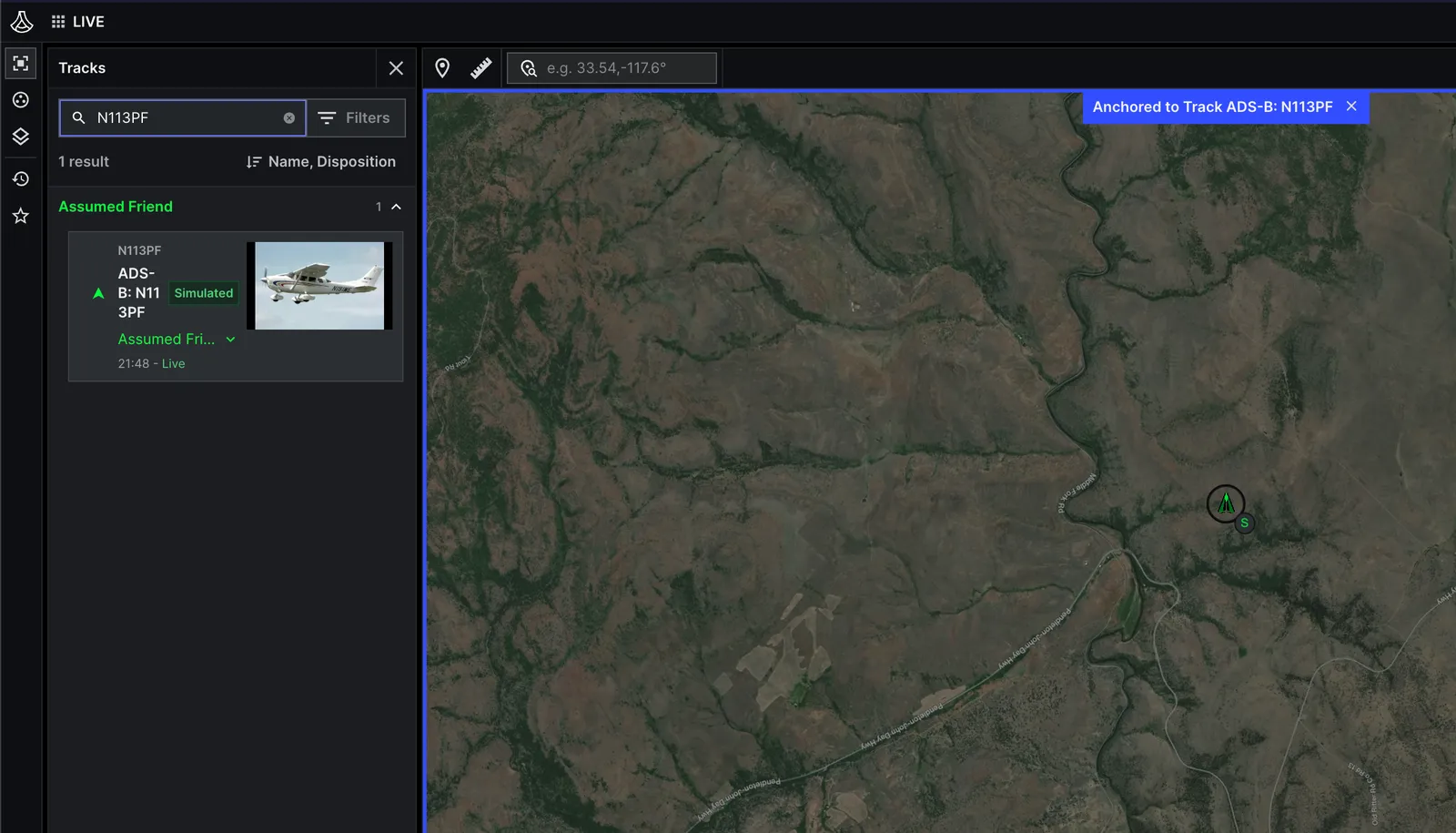
To see the track thumbnail, open the example C2 app, and do the following:
#### Open the track panel
Open the track panel from the left hand sidebar.
Enter the `aliases.name` of the surface vessel in the search bar.
If you are developing on Sandboxes, enter the following name: N113PF.
#### Verify the thumbnail
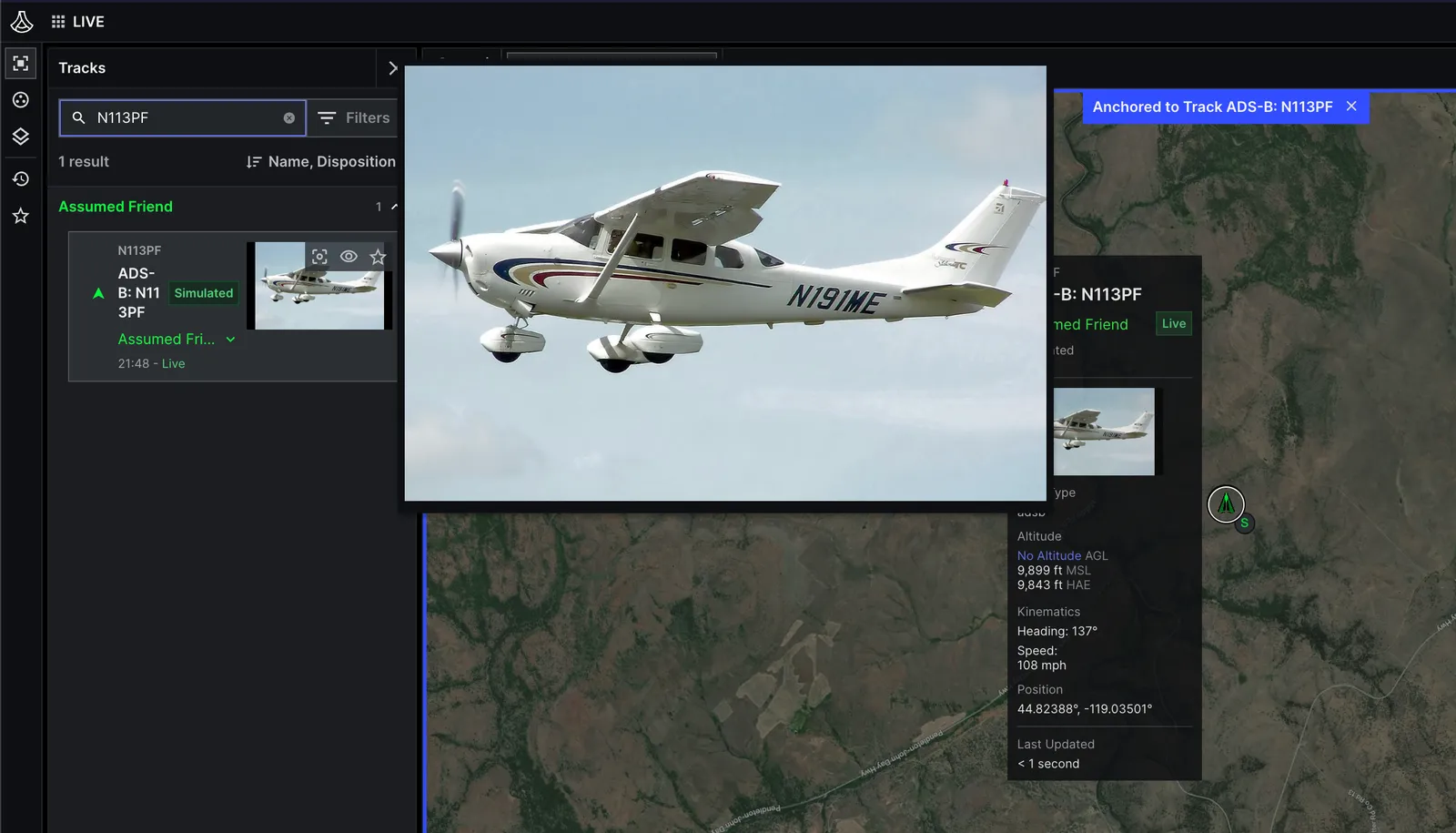
Select the thumbnail associated with the track to expand the image:
## Link multiple objects
In some cases, you might associate more than one object with an entity. An airplane, for instance, might link to an image
to display a thumbnail, and a CSV that contains additional metadata, such as the airplane's flight manifest.
To do this, get the existing media linked with the entity, then override the entity's `media` component
to append a new `MediaItem` to the list:
#### Create a manifest
Copy and paste the example into a new CSV file, named `manifest.csv`:
```csv title={"manifest.csv"} maxLines={10}
FlightID,FlightName,PilotName,DepartureAirport,ArrivalAirport,DepartureTime,ArrivalTime
67890,Cessna Flight,Jane Pilot,John Wayne Airport,San Francisco International,2023-10-01 09:00,2023-10-01 11:00
PassengerID,PassengerName,Weight
P001,Thomas Pynchon,180
P002,Anthony Burgess,150
CargoID,Description,Weight
001,Luggage,50
002,Equipment,30
```
#### Upload the file
Run the following code from the same folder where you saved `manifest.csv`.
To upload, use [`UploadObject`](/reference/rest/objects/upload-object) and replace the following:
* **file\_path**: The path to the file you want to upload to Lattice,
in this case, `./manifest.csv`
```go title={"Go"} maxLines={25}
package main
import (
"bytes"
"context"
"fmt"
"net/http"
"os"
"path/filepath"
"github.com/anduril/lattice-sdk-go/v5/client"
"github.com/anduril/lattice-sdk-go/v5/option"
)
func main() {
// Get environment variables.
latticeEndpoint := os.Getenv("LATTICE_ENDPOINT")
environmentToken := os.Getenv("ENVIRONMENT_TOKEN")
// Remove sandboxesToken from the following statements if you are not developing on Sandboxes.
sandboxesToken := os.Getenv("SANDBOXES_TOKEN")
// Check required environment variables.
if latticeEndpoint == "" || environmentToken == "" || sandboxesToken == "" {
fmt.Println("Missing required environment variables")
os.Exit(1)
}
// Initialize headers for sandbox authorization.
headers := http.Header{}
headers.Add("Anduril-Sandbox-Authorization", fmt.Sprintf("Bearer %s", sandboxesToken))
// Create the client
c := client.NewClient(
option.WithToken(environmentToken),
option.WithBaseURL(fmt.Sprintf("https://%s", latticeEndpoint)),
option.WithHTTPHeader(headers),
)
// Set the file path.
filePath := ""
// Get the file name.
fileName := filepath.Base(filePath)
// Read the file contents into a byte slice.
fileContent, err := os.ReadFile(filePath)
if err != nil {
fmt.Printf("Error reading file: %v\n", err)
os.Exit(1)
}
// Create context for the request.
ctx := context.Background()
// Upload the file to Lattice.
response, err := c.Objects.UploadObject(ctx, fileName, bytes.NewReader(fileContent))
if err != nil {
fmt.Printf("Error uploading object: %v\n", err)
os.Exit(1)
}
// Get the content identifier path.
path := response.ContentIdentifier.Path
fmt.Printf("Object path: /api/v1/objects/%s\n", path)
}
```
```java title={"Java"} maxLines={25}
package org.example;
import java.io.File;
import java.io.FileInputStream;
import com.anduril.Lattice;
public class Upload {
public static void main(String[] args) {
// Get environment variables
String endpoint = System.getenv("LATTICE_ENDPOINT");
String environmentToken = System.getenv("ENVIRONMENT_TOKEN");
String sandboxesToken = System.getenv("SANDBOXES_TOKEN");
// Check required variables and ensure URL has https://
if (endpoint == null || environmentToken == null || sandboxesToken == null) {
System.err.println("Missing required environment variables");
System.exit(1);
}
if (!endpoint.startsWith("https://")) endpoint = "https://" + endpoint;
try {
// Create Lattice client with Sandbox authentication
Lattice client = Lattice.builder()
.url(endpoint)
.token(environmentToken)
.addHeader("Anduril-Sandbox-Authorization", "Bearer " + sandboxesToken)
.build();
// Set the file path
String filePath = "";
File file = new File(filePath);
// Get the file name
String fileName = file.getName();
String objectPath = fileName;
// Open the file and upload it
try (FileInputStream fileStream = new FileInputStream(file)) {
// Upload the file to Lattice
Object response = client.objects().uploadObject(objectPath, fileStream);
System.out.println("Object path: /api/v1/objects/" + response);
} catch (Exception e) {
System.err.println("Error uploading object: " + e.getMessage());
}
} catch (Exception e) {
System.err.println("Error initializing client: " + e.getMessage());
}
}
}
```
```py title={"Python"} maxLines={25}
from anduril import Lattice
import os
import sys
import asyncio
lattice_endpoint = os.getenv('LATTICE_ENDPOINT')
environment_token = os.getenv('ENVIRONMENT_TOKEN')
# Remove sandboxes_token from the following statements if you are not developing on Sandboxes.
sandboxes_token = os.getenv('SANDBOXES_TOKEN')
if not environment_token or not lattice_endpoint or not sandboxes_token:
print("Missing required environment variables.")
sys.exit(1)
client = Lattice(
base_url=f"https://{lattice_endpoint}",
token=lambda: str(environment_token),
# Remove the following if you are not developing on Sandboxes.
headers={ "anduril-sandbox-authorization": f"Bearer {sandboxes_token}" }
)
async def app(file_path):
try:
# Get the file name.
file_name = os.path.basename(file_path)
# Define a unique path for the object using the file name.
object_path = f"{file_name}"
# Open the file in binary mode.
with open(f"{file_path}", "rb") as file:
# Use the upload_object method to upload the file to Lattice.
response = client.objects.upload_object(
object_path=object_path,
request=file
)
object_path = f"/api/v1/objects/{response.content_identifier.path}"
print(f"Object path: {object_path}")
except asyncio.CancelledError:
print(">>>Exiting...")
except Exception as error:
print(error)
if __name__ == "__main__":
# Set the file path.
asyncio.run(app(file_path=""))
```
```ts title={"Typescript"} maxLines={25}
import { LatticeClient } from "@anduril-industries/lattice-sdk";
import { basename } from 'path';
import { createReadStream } from "fs";
const latticeEndpoint = process.env.LATTICE_ENDPOINT;
const environmentToken = process.env.ENVIRONMENT_TOKEN;
// Remove sandboxesToken from the following statements if you are not developing on Sandboxes.
const sandboxesToken = process.env.SANDBOXES_TOKEN;
if (!latticeEndpoint || !environmentToken || !sandboxesToken) {
console.log('Missing required environment variables.');
process.exit(1);
}
const client = new LatticeClient(
{
baseUrl: `https://${latticeEndpoint}`,
token: environmentToken,
// Remove the header if you are not developing on Sandboxes.
headers: { "Anduril-Sandbox-Authorization": `Bearer ${sandboxesToken}` }
}
);
async function App(filePath: string) {
const fileStreamReadable = createReadStream(filePath);
try {
// Set the object path using the file name.
const objectPath = `${basename(filePath)}`;
// Upload the file to Lattice.
const result = await client.objects.uploadObject(fileStreamReadable, objectPath);
console.log(`Object uploaded successfully. Object path: ${result.content_identifier.path}`);
} catch (error) {
if (error instanceof Error && error.name === 'AbortError') {
console.log('Process interrupted. Exiting...');
process.exit(0);
} else {
console.log(`Encountered the following error: ${error}`);
process.exit(1);
}
} finally {
fileStreamReadable.close();
}
}
// Replace filepath with the path of the file you want to upload.
const filePath = "";
App(filePath);
```
```rs title={"Rust"} startLine={35} maxLines={25}
use anduril_lattice_sdk::prelude::*;
use std::env;
#[tokio::main]
async fn main() -> Result<(), Box> {
let lattice_endpoint = env::var("LATTICE_ENDPOINT")
.expect("LATTICE_ENDPOINT environment variable not set");
let environment_token = env::var("ENVIRONMENT_TOKEN")
.expect("ENVIRONMENT_TOKEN environment variable not set");
// Remove sandboxes_token if you are not developing on Sandboxes.
let sandboxes_token = env::var("SANDBOXES_TOKEN")
.expect("SANDBOXES_TOKEN environment variable not set");
if environment_token.is_empty() || lattice_endpoint.is_empty() || sandboxes_token.is_empty() {
eprintln!("Missing required environment variables:");
eprintln!(" LATTICE_ENDPOINT");
eprintln!(" ENVIRONMENT_TOKEN");
eprintln!(" SANDBOXES_TOKEN");
std::process::exit(1);
}
let config = ClientConfig {
base_url: format!("https://{}", lattice_endpoint),
token: Some(environment_token),
// Remove custom_headers if you are not developing on Sandboxes.
custom_headers: HashMap::from([(
"anduril-sandbox-authorization".to_string(),
format!("Bearer {}", sandboxes_token),
)]),
..Default::default()
};
let client = Lattice::new(config)?;
// Set the file path to upload.
let file_path = "";
let result = async {
// Derive the object name from the file name and read the file bytes.
let file_name = std::path::Path::new(file_path)
.file_name()
.and_then(|n| n.to_str())
.unwrap_or(file_path);
let object_path = file_name.to_string();
let bytes = std::fs::read(file_path)?;
// Use the upload_object method to upload the file to Lattice.
let response = client.objects.upload_object(&object_path, &bytes, None).await?;
println!(
"Object path: /api/v1/objects/{}",
response.content_identifier.path
);
Ok::<(), Box>(())
}
.await;
if let Err(e) = result {
eprintln!("{}", e);
}
Ok(())
}
```
#### Override the entity
Use [`OverrideEntity`](/reference/rest/entities/override-entity) to modify the entity's
[`media`](/reference/rest/entities/publish-entity#request.body.media) component and append a new `MediaItem`.
This `MediaItem` references `manifest.csv`.
To run the code, replace the following:
* **object\_path**: The unique path of the object in Lattice.
For this example, use `/api/v1/objects/manifest.csv`.
* **entity\_id**: The ID of the entity you want to associate with the object.
```go title={"Go (REST)"} maxLines={25}
package main
import (
"context"
"fmt"
"net/http"
"os"
"time"
Lattice "github.com/anduril/lattice-sdk-go/v5"
"github.com/anduril/lattice-sdk-go/v5/client"
"github.com/anduril/lattice-sdk-go/v5/option"
)
func main() {
latticeEndpoint := os.Getenv("LATTICE_ENDPOINT")
environmentToken := os.Getenv("ENVIRONMENT_TOKEN")
// Remove sandboxesToken from the following statements if you are not developing on Sandboxes.
sandboxesToken := os.Getenv("SANDBOXES_TOKEN")
if latticeEndpoint == "" || environmentToken == "" || sandboxesToken == "" {
fmt.Println("Missing required environment variables")
os.Exit(1)
}
headers := http.Header{}
headers.Add("Anduril-Sandbox-Authorization", fmt.Sprintf("Bearer %s", sandboxesToken))
LatticeClient := client.NewClient(
option.WithToken(environmentToken),
option.WithBaseURL(fmt.Sprintf("https://%s", latticeEndpoint)),
option.WithHTTPHeader(headers),
)
// Set the path to the object and entity ID.
objectPath := "/api/v1/objects/"
entityID := "adsbEntity"
ctx := context.Background()
// Retrieve the existing entity to get its current media items.
existingEntity, err := LatticeClient.Entities.GetEntity(ctx, &Lattice.GetEntityRequest{EntityID: entityID})
if err != nil {
fmt.Printf("Exception when retrieving entity: %v\n", err)
return
}
var existingMediaItems []*Lattice.MediaItem
if existingEntity.Media != nil && existingEntity.Media.Media != nil {
existingMediaItems = existingEntity.Media.Media
}
// Create a new media item to append.
newMediaItem := &Lattice.MediaItem{
Type: Lattice.MediaItemTypeMediaTypeImage.Ptr(),
RelativePath: &objectPath,
}
// Append the new media item to the existing ones.
updatedMediaItems := append(existingMediaItems, newMediaItem)
updatedMedia := Lattice.Media{
Media: updatedMediaItems,
}
latestTimestamp := time.Now().UTC()
// Create an entity override with the updated media.
entityOverride := Lattice.EntityOverride{
EntityID: entityID,
FieldPath: "media.media",
Entity: &Lattice.Entity{
EntityID: &entityID,
Media: &updatedMedia,
},
Provenance: &Lattice.Provenance{
IntegrationName: Lattice.String("your_integration_name"),
DataType: Lattice.String("test_data"),
SourceUpdateTime: Lattice.Time(latestTimestamp),
},
}
// Override the entity's media.
_, err = LatticeClient.Entities.OverrideEntity(
ctx,
&entityOverride,
)
if err != nil {
fmt.Printf("Exception: %v\n", err)
} else {
fmt.Printf("Successfully appended media to entity: %s\n", entityID)
}
}
```
```java title={"Java (REST)"} maxLines={25}
package org.example;
import java.time.OffsetDateTime;
import java.time.ZoneOffset;
import java.util.ArrayList;
import java.util.List;
import com.anduril.Lattice;
import com.anduril.resources.entities.requests.EntityOverride;
import com.anduril.types.Entity;
import com.anduril.types.Media;
import com.anduril.types.MediaItem;
import com.anduril.types.Provenance;
/**
* Example application that demonstrates how to append a media item to an entity's existing media
* using the Lattice SDK.
*/
public class OverrideMediaAppend {
public static void main(String[] args) {
// Get environment variables
String endpoint = System.getenv("LATTICE_ENDPOINT");
String environmentToken = System.getenv("ENVIRONMENT_TOKEN");
String sandboxesToken = System.getenv("SANDBOXES_TOKEN");
if (endpoint == null || environmentToken == null || sandboxesToken == null) {
System.err.println("Missing required environment variables");
System.exit(1);
}
if (!endpoint.startsWith("https://")) endpoint = "https://" + endpoint;
try {
// Create Lattice client with Sandbox authentication
Lattice client = Lattice.builder()
.url(endpoint)
.token(environmentToken)
.addHeader("Anduril-Sandbox-Authorization", "Bearer " + sandboxesToken)
.build();
// Set the path to the object and entity ID
String objectPath = "test.jpg";
String entityId = "adsbEntity";
// Retrieve the existing entity
Entity existingEntity = client.entities().getEntity(entityId);
// Get existing media items or create a new list if none exist
List mediaItems = new ArrayList<>();
if (existingEntity.getMedia() != null) {
mediaItems.addAll(existingEntity.getMedia()
.get()
.getMedia()
.get()
);
}
// Create a new media item
MediaItem newMediaItem = MediaItem.builder()
.relativePath(objectPath)
.build();
// Append the new media item to the list
mediaItems.add(newMediaItem);
// Create a Media object with the updated media list
Media media = Media.builder()
.media(mediaItems)
.build();
Provenance provenance = Provenance.builder()
.integrationName("your_integration_name")
.dataType("your_data_type")
.sourceUpdateTime(OffsetDateTime.now(ZoneOffset.UTC))
.build();
// Create an entity with the updated media
Entity entity = Entity.builder()
.entityId(entityId)
.media(media)
.build();
// Create an EntityOverride object with the entity and provenance
EntityOverride entityOverride = EntityOverride.builder()
.entity(entity)
.provenance(provenance)
.build();
// Override the entity's media
client.entities().overrideEntity(
entityId,
"media.media",
entityOverride
);
System.out.println("Successfully appended media to entity: " + entityId);
} catch (Exception e) {
System.err.println("Exception: " + e.getMessage());
}
}
}
```
```py title={"Python (REST)"} maxLines={25}
from anduril import Lattice, Media, MediaItem, Entity, Provenance
from datetime import datetime, timezone
import os
import sys
import asyncio
lattice_endpoint = os.getenv('LATTICE_ENDPOINT')
environment_token = os.getenv('ENVIRONMENT_TOKEN')
# Remove sandboxes_token from the following statements if you are not developing on a Sandboxes.
sandboxes_token = os.getenv('SANDBOXES_TOKEN')
if not environment_token or not lattice_endpoint or not sandboxes_token:
print("Missing required environment variables.")
sys.exit(1)
client = Lattice(
base_url=f"https://{lattice_endpoint}",
token=lambda: str(environment_token),
# Remove the following if you are not developing on a Sandboxes.
headers={ "anduril-sandbox-authorization": f"Bearer {sandboxes_token}" }
)
async def app(object_path, entity_id):
try:
latest_timestamp = datetime.now(timezone.utc)
# Retrieve the existing entity.
entity = client.entities.get_entity(entity_id=entity_id)
media = entity.media.media if entity.media and entity.media.media else []
new_media_item = MediaItem(
relative_path=object_path
)
# Append the new MediaItem to the existing media list.
media.append(new_media_item)
# Create a Media object with the updated media list
media = Media(
media=media
)
provenance = Provenance(
integration_name="your_integration_name",
data_type="your_data_type",
source_update_time=latest_timestamp
)
client.entities.override_entity(
entity_id=entity_id,
field_path="media.media",
entity=Entity(
entity_id=entity_id,
media=media
),
provenance=provenance
)
except Exception as error:
print(f"Exception: {error}")
if __name__ == "__main__":
# Set the path to the object and entity ID
asyncio.run(app(object_path="/api/v1/objects/", entity_id="adsbEntity"))
```
```ts title={"Typescript (REST)"} maxLines={25}
import { LatticeClient } from "@anduril-industries/lattice-sdk";
const latticeEndpoint = process.env.LATTICE_ENDPOINT;
const environmentToken = process.env.ENVIRONMENT_TOKEN;
// Remove sandboxesToken from the following statements if you are not developing on Sandboxes.
const sandboxesToken = process.env.SANDBOXES_TOKEN;
if (!latticeEndpoint || !environmentToken || !sandboxesToken) {
console.log('Missing required environment variables.');
process.exit(1);
}
const client = new LatticeClient(
{
baseUrl: `https://${latticeEndpoint}`,
token: environmentToken,
// Remove the header if you are not developing on Sandboxes.
headers: { "Anduril-Sandbox-Authorization": `Bearer ${sandboxesToken}` }
}
);
async function App(entityId: string, objectPath: string) {
const latestTimestamp = new Date().toISOString();
try {
// Retrieve the existing entity.
const entity = await client.entities.getEntity({ entityId });
const media = entity.media?.media || [];
// Append the new MediaItem to the existing media list.
media.push({
relativePath: objectPath
});
// Override the media for the entity.
await client.entities.overrideEntity(
{
entityId,
fieldPath: 'media.media',
entity: {
entityId: entityId,
media: {
media: media
}
},
provenance: {
integrationName: "your_integration_name",
dataType: "your_data_type",
sourceDescription: latestTimestamp
}
}
);
console.log(`Successfully overridden media for entity ${entityId}`);
} catch (error) {
console.log(`Encountered the following error while fetching entity: ${error}`);
}
}
// Replace entityId with the ID of the entity you want to override.
// Replace objectPath with the path of the object you want to link to the entity.
const entityId = 'adsbEntity';
const objectPath = '/api/v1/objects/manifest.csv';
App(entityId, objectPath);
```
```rs title={"Rust (REST)"} startLine={35} maxLines={25}
use anduril_lattice_sdk::prelude::*;
use std::env;
#[tokio::main]
async fn main() -> Result<(), Box> {
let lattice_endpoint = env::var("LATTICE_ENDPOINT")
.expect("LATTICE_ENDPOINT environment variable not set");
let environment_token = env::var("ENVIRONMENT_TOKEN")
.expect("ENVIRONMENT_TOKEN environment variable not set");
// Remove sandboxes_token if you are not developing on Sandboxes.
let sandboxes_token = env::var("SANDBOXES_TOKEN")
.expect("SANDBOXES_TOKEN environment variable not set");
if environment_token.is_empty() || lattice_endpoint.is_empty() || sandboxes_token.is_empty() {
eprintln!("Missing required environment variables:");
eprintln!(" LATTICE_ENDPOINT");
eprintln!(" ENVIRONMENT_TOKEN");
eprintln!(" SANDBOXES_TOKEN");
std::process::exit(1);
}
let config = ClientConfig {
base_url: format!("https://{}", lattice_endpoint),
token: Some(environment_token),
// Remove custom_headers if you are not developing on Sandboxes.
custom_headers: HashMap::from([(
"anduril-sandbox-authorization".to_string(),
format!("Bearer {}", sandboxes_token),
)]),
..Default::default()
};
let client = Lattice::new(config)?;
// Set the path to the object and the entity ID to override.
let object_path = "/api/v1/objects/";
let entity_id = "";
let latest_timestamp = Utc::now().fixed_offset();
// Retrieve the existing entity so we can append to its media list.
let result = async {
let entity = client.entities.get_entity(entity_id, None).await?;
let mut media = entity
.media
.and_then(|m| m.media)
.unwrap_or_default();
// Append the new MediaItem to the existing media list.
media.push(MediaItem {
relative_path: Some(object_path.to_string()),
..Default::default()
});
let provenance = Provenance {
integration_name: Some("your_integration_name".to_string()),
data_type: Some("your_data_type".to_string()),
source_update_time: Some(latest_timestamp),
..Default::default()
};
let override_request = EntityOverride {
entity: Some(Entity {
entity_id: Some(entity_id.to_string()),
media: Some(Media {
media: Some(media),
..Default::default()
}),
..Default::default()
}),
provenance: Some(provenance),
};
client
.entities
.override_entity(entity_id, "media.media", &override_request, None)
.await?;
// Re-fetch the entity to confirm the media item was appended.
let entity = client.entities.get_entity(entity_id, None).await?;
println!("Entity: {:?}", entity.entity_id);
println!("Media: {:?}", entity.media);
Ok::<(), ApiError>(())
}
.await;
if let Err(e) = result {
eprintln!("Exception: {}", e);
}
Ok(())
}
```
```go title={"Go (gRPC)"} maxLines={25}
// This Go example is compatible with artifacts generated using
// the following grpc/go plugin: https://buf.build/anduril/lattice-sdk/sdks/main:grpc/go
package main
import (
"context"
"fmt"
"log"
"os"
"time"
"schema-registry.developer.anduril.com/gen/go/anduril/lattice-sdk/grpc/go/anduril/entitymanager/v1/entitymanagerv1grpc"
entitymanagerv1 "schema-registry.developer.anduril.com/gen/go/anduril/lattice-sdk/protocolbuffers/go/anduril/entitymanager/v1"
"google.golang.org/grpc"
"google.golang.org/grpc/credentials"
"google.golang.org/protobuf/types/known/timestamppb"
)
func main() {
// Get environment variables
environmentToken := os.Getenv("ENVIRONMENT_TOKEN")
latticeEndpoint := os.Getenv("LATTICE_ENDPOINT")
sandboxesToken := os.Getenv("SANDBOXES_TOKEN")
// Check required environment variables
if latticeEndpoint == "" || environmentToken == "" || sandboxesToken == "" {
fmt.Println("Missing required environment variables")
os.Exit(1)
}
// Setup authentication
auth := &BearerTokenAuth{
Token: environmentToken,
SandboxesToken: sandboxesToken,
}
// Setup gRPC connection options
opts := []grpc.DialOption{
grpc.WithTransportCredentials(credentials.NewClientTLSFromCert(nil, "")),
grpc.WithPerRPCCredentials(auth),
}
// Create gRPC connection
conn, err := grpc.NewClient(latticeEndpoint, opts...)
if err != nil {
log.Fatalf("Did not connect: %v", err)
}
defer conn.Close()
// Create EntityManager client
client := entitymanagerv1grpc.NewEntityManagerAPIClient(conn)
// Set the path to the object and entity ID
objectPath := "/api/v1/objects/"
entityID := "adsbEntity"
// Create context for the request
ctx := context.Background()
// Retrieve the existing entity to get its current media items
getRequest := &entitymanagerv1.GetEntityRequest{
EntityId: entityID,
}
existingEntity, err := client.GetEntity(ctx, getRequest)
if err != nil {
fmt.Printf("Exception when retrieving entity: %v\n", err)
return
}
// Extract existing media items
var existingMediaItems []*entitymanagerv1.MediaItem
existingMediaItems = existingEntity.GetEntity().GetMedia().GetMedia()
// Create a new media item to append
newMediaItem := &entitymanagerv1.MediaItem{
Type: entitymanagerv1.MediaType_MEDIA_TYPE_IMAGE,
RelativePath: objectPath,
}
// Append the new media item to the existing ones
updatedMediaItems := append(existingMediaItems, newMediaItem)
updatedMedia := &entitymanagerv1.Media{
Media: updatedMediaItems,
}
// Create a provenance object with current timestamp
latestTimestamp := time.Now().UTC()
provenance := &entitymanagerv1.Provenance{
IntegrationName: "your_integration_name",
DataType: "test_data",
SourceUpdateTime: timestamppb.New(latestTimestamp),
}
// Create an entity with the updated media
entity := &entitymanagerv1.Entity{
EntityId: entityID,
Media: updatedMedia,
}
// Create the override entity request
request := &entitymanagerv1.OverrideEntityRequest{
Entity: entity,
FieldPath: []string{"media.media"},
Provenance: provenance,
}
// Call the OverrideEntity method
_, err = client.OverrideEntity(ctx, request)
// Handle errors
if err != nil {
fmt.Printf("Exception: %v\n", err)
} else {
fmt.Printf("Successfully appended media to entity: %s\n", entityID)
}
}
```
```py title={"Python (gRPC)"} maxLines={25}
# This Python example is compatible with artifacts generated using the following
# Buf plugins: https://schema-registry.developer.anduril.com/anduril/lattice-sdk/sdks/main:bufbuild/py
# and https://schema-registry.developer.anduril.com/anduril/lattice-sdk/sdks/main:connectrpc/py
import os
import sys
from datetime import datetime, timezone
from bearer_auth import create_client
from protobuf.wkt import Timestamp
from anduril.entitymanager.v1.entity_pub_pb import Entity, Provenance
from anduril.entitymanager.v1.entity_manager_api_pub_pb import (
GetEntityRequest,
OverrideEntityRequest,
)
from anduril.entitymanager.v1.entity_manager_api_pub_connect import EntityManagerAPIClientSync
from anduril.entitymanager.v1.media_pub_pb import Media, MediaItem, MediaType
def main():
environment_token = os.getenv("ENVIRONMENT_TOKEN")
lattice_endpoint = os.getenv("LATTICE_ENDPOINT")
sandboxes_token = os.getenv("SANDBOXES_TOKEN")
if not environment_token or not lattice_endpoint or not sandboxes_token:
print("Missing required environment variables", file=sys.stderr)
sys.exit(1)
# Create the API client over Connect gRPC with authentication
client = create_client(EntityManagerAPIClientSync, lattice_endpoint, environment_token, sandboxes_token)
object_path = "/api/v1/objects/"
entity_id = "adsbEntity"
# Retrieve the existing entity to get its current media items
try:
existing_entity = client.get_entity(GetEntityRequest(entity_id=entity_id))
except Exception as error:
print(f"Exception when retrieving entity: {error}", file=sys.stderr)
return
existing_media_items = list(existing_entity.entity.media.media)
# Append a new media item to the existing list
new_media_item = MediaItem(type=MediaType.IMAGE, relative_path=object_path)
updated_media = Media(media=[*existing_media_items, new_media_item])
latest_timestamp = Timestamp.from_datetime(datetime.now(timezone.utc))
provenance = Provenance(
integration_name="your_integration_name",
data_type="test_data",
source_update_time=latest_timestamp,
)
entity = Entity(entity_id=entity_id, media=updated_media)
request = OverrideEntityRequest(
entity=entity,
field_path=["media.media"],
provenance=provenance,
)
try:
client.override_entity(request)
print(f"Successfully appended media to entity: {entity_id}")
except Exception as error:
print(f"Exception: {error}", file=sys.stderr)
if __name__ == "__main__":
main()
```
```rs title={"Rust (gRPC)"} maxLines={25}
// This Rust example is compatible with artifacts generated using
// the following grpc/rust plugin: https://buf.build/anduril/lattice-sdk/sdks/main:community/neoeinstein-tonic
mod bearer_auth;
use anduril_lattice_sdk_community_neoeinstein_prost::anduril::entitymanager::v1::{
Entity, GetEntityRequest, Media, MediaItem, MediaType, OverrideEntityRequest, Provenance,
};
use anduril_lattice_sdk_community_neoeinstein_tonic::anduril::entitymanager::v1::tonic::entity_manager_api_client::EntityManagerApiClient;
use bearer_auth::EnvironmentTokenAuth;
use prost_types::Timestamp;
use tonic::metadata::MetadataValue;
use tonic::transport::{Channel, ClientTlsConfig};
use tonic::Request;
use std::env;
use std::time::{SystemTime, UNIX_EPOCH};
fn now_timestamp() -> Timestamp {
let d = SystemTime::now().duration_since(UNIX_EPOCH).unwrap();
Timestamp {
seconds: d.as_secs() as i64,
nanos: d.subsec_nanos() as i32,
}
}
#[tokio::main]
async fn main() -> Result<(), Box> {
let environment_token = env::var("ENVIRONMENT_TOKEN")
.expect("ENVIRONMENT_TOKEN environment variable not set");
let lattice_endpoint = env::var("LATTICE_ENDPOINT")
.expect("LATTICE_ENDPOINT environment variable not set");
let sandboxes_token = env::var("SANDBOXES_TOKEN")
.expect("SANDBOXES_TOKEN environment variable not set");
let auth = EnvironmentTokenAuth::new(
environment_token,
sandboxes_token,
);
let tls_config = ClientTlsConfig::new().with_native_roots();
let channel = Channel::from_shared(format!("https://{}", lattice_endpoint))?
.tls_config(tls_config)?
.connect()
.await?;
let access_token = auth.get_token().await?;
let sandboxes_token = auth.sandboxes_token();
let auth_header: MetadataValue<_> = format!("Bearer {}", access_token).parse()?;
let sandbox_header: MetadataValue<_> = format!("Bearer {}", sandboxes_token).parse()?;
let mut client = EntityManagerApiClient::with_interceptor(
channel,
move |mut req: Request<()>| {
req.metadata_mut()
.insert("authorization", auth_header.clone());
req.metadata_mut()
.insert("anduril-sandbox-authorization", sandbox_header.clone());
Ok(req)
},
);
let object_path = "/api/v1/objects/".to_string();
let entity_id = "adsbEntity".to_string();
// Retrieve the existing entity to get its current media items
let existing = match client
.get_entity(Request::new(GetEntityRequest {
entity_id: entity_id.clone(),
}))
.await
{
Ok(resp) => resp.into_inner(),
Err(e) => {
println!("Exception when retrieving entity: {}", e);
return Ok(());
}
};
let mut media_items: Vec = existing
.entity
.and_then(|e| e.media)
.map(|m| m.media)
.unwrap_or_default();
// Append the new media item to the existing ones
media_items.push(MediaItem {
item_identifier: "image-1".to_string(),
r#type: MediaType::Image as i32,
relative_path: object_path,
});
let request = Request::new(OverrideEntityRequest {
entity: Some(Entity {
entity_id: entity_id.clone(),
media: Some(Media {
media: media_items,
}),
..Default::default()
}),
field_path: vec!["media.media".to_string()],
provenance: Some(Provenance {
integration_name: "your_integration_name".to_string(),
data_type: "test_data".to_string(),
source_update_time: Some(now_timestamp()),
..Default::default()
}),
});
match client.override_entity(request).await {
Ok(_) => println!("Successfully appended media to entity: {}", entity_id),
Err(e) => println!("Exception: {}", e),
}
Ok(())
}
```
#### Verify the response
If successful, you'll see the entity updated with the following `media` component:
```json
"media": {
"media": [
{
"url": "",
"type": "MEDIA_TYPE_IMAGE",
"relativePath": "/api/v1/objects/cessna.jpg"
},
{
"url": "",
"type": "MEDIA_TYPE_INVALID",
"relativePath": "/api/v1/objects/manifest.csv"
}
]
}
```
Because the manifest is not an image used as a thumbnail, by default,
Lattice assigns the item's media type to `MEDIA_TYPE_INVALID`.
## What's next?
* Learn how to [fetch and process](/guides/objects/download) objects from Lattice.
* Learn more about the [Object API](/reference/rest/objects/list-objects) in the *Lattice API Reference*.
> Storing binary data in Lattice using the SDK